
Imagine opening a website on your smartphone while commuting through Nairobi traffic, only to watch a high-resolution hero image load painfully slow, line by line, while the rest of the page remains frozen. Frustrated, you tap the back button and visit a competitor’s lightning-fast site instead.
Images are the lifeblood of modern web design. They break up dense walls of text, showcase products, and bring case studies to life. However, unoptimized images are also the number one cause of bloated web pages, sluggish mobile performance, and lost conversions. Furthermore, when optimized correctly, images become a powerful secondary traffic stream through Google Image Search.
In this comprehensive guide, we will walk you through everything you need to know to optimize your website’s images for blazing-fast loading speeds and top-tier search engine rankings.
Why Image Optimization Matters for SEO and UX
Some website owners believe that dropping high-resolution images straight from a DSLR camera or stock photography site onto a page is fine as long as the content looks stunning. In reality, large image files inflict severe penalties on your digital performance:
+-------------------------------------------------------------+
|               THE COST OF UNOPTIMIZED IMAGES                |
+-------------------------------------------------------------+
|  • Sluggish Core Web Vitals (Poor Largest Contentful Paint) |
|  • High Mobile Bounce Rates on Cellular Networks            |
|  • Wasted Search Engine Crawl Budget                        |
|  • Missed Traffic Opportunities in Google Image Search      |
+-------------------------------------------------------------+
1. Boosting Core Web Vitals (LCP)
Google’s Core Web Vitals heavily weight page speed, particularly Largest Contentful Paint (LCP), which measures how fast the main visual element above the fold loads. Bulky hero images delay LCP, dragging down your search rankings.
2. Capturing Google Image Search Traffic
Millions of users discover businesses, products, and ideas through Google Image Search. Optimizing your images with descriptive filenames, alt text, and structured context opens up an entirely separate acquisition channel for high-intent traffic.
Step 1: Resize Images Before Uploading
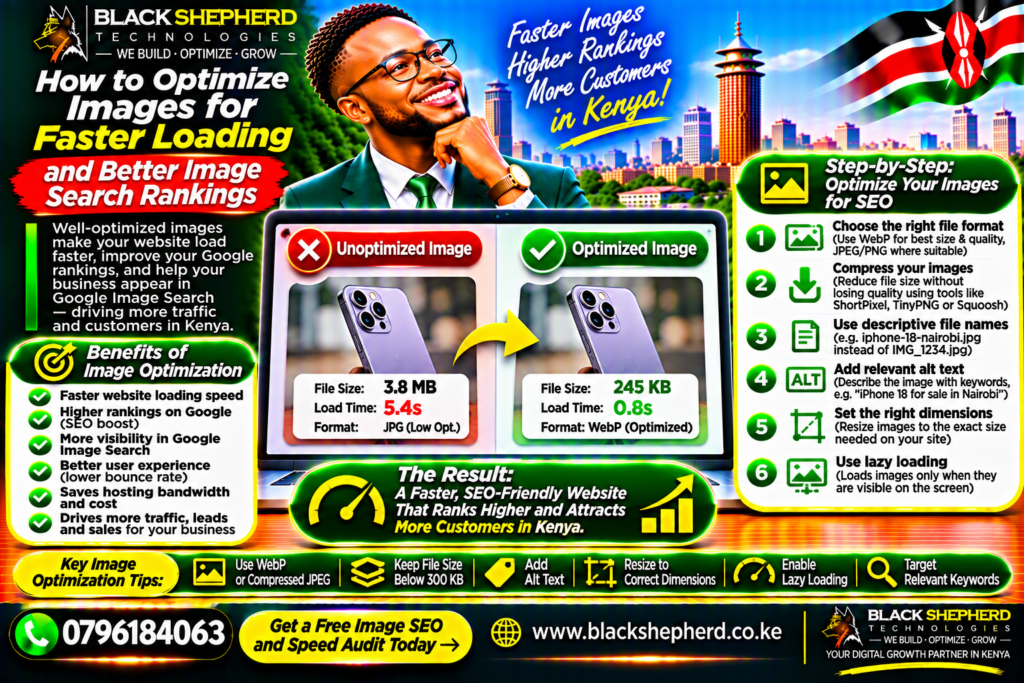
One of the most common mistakes website owners make is uploading a 4000-pixel-wide photograph when the image container on their web page is only 800 pixels wide. Your browser is forced to download the massive file and scale it down on the fly, wasting precious processing power and bandwidth.
-
Determine Display Dimensions: Check your website’s layout and determine the maximum display width your images will ever occupy (e.g., standard blog post images rarely need to exceed 1200 pixels in width).
-
Crop and Resize: Always resize your images using editing software (like Photoshop, Canva, or free tools like Squoosh) to match their actual display dimensions before uploading them to your content management system.
Step 2: Choose the Right Next-Gen File Format
Not all image formats are created equal. Choosing the right format balances visual clarity with file size efficiency:
-
WebP and AVIF (Next-Gen Formats): These are the gold standards for modern web performance. WebP offers superior compression for both lossy and lossless images compared to older formats, often reducing file sizes by 25–35% without visible quality loss.
-
JPEG: Ideal for complex photographs and realistic imagery with smooth color gradients.
-
PNG: Best for graphics, illustrations, icons, or images requiring transparent backgrounds. Avoid using PNGs for large photographs, as the file sizes balloon rapidly.
-
SVG: Perfect for logos, vector graphics, and simple UI icons because they scale infinitely to any screen resolution without losing clarity or adding heavy file weight.
Step 3: Compress Files Without Losing Quality
Image compression strips away unnecessary metadata and reduces color depth without degrading visual fidelity.
-
Lossy Compression: Permanently removes a small amount of redundant data, drastically shrinking file size with virtually imperceptible difference to the human eye.
-
Lossless Compression: Reduces file size without losing a single pixel of data, though the reduction in file weight is smaller.
If you use WordPress or another major CMS, plugins like Imagify, ShortPixel, or TinyPNG can automatically compress and convert your uploaded images into next-gen WebP formats upon upload.
Step 4: Write Descriptive Alt Text and Filenames
Search engines cannot “see” an image the way humans do; they rely on text clues to understand what an image depicts. Optimizing your text attributes is vital for both accessibility (screen readers for visually impaired users) and image SEO.
+-------------------------------------------------------------+
|                   ALT TEXT BEST PRACTICES                   |
+-------------------------------------------------------------+
|  ❌ POOR:   IMG_8493.jpg (Alt: "image")                     |
|  GOOD:    nairobi-seo-consultant-meeting.jpg                |
|             (Alt: "SEO consultant reviewing website data in  |
|              a modern office in Nairobi")                   |
+-------------------------------------------------------------+
1. Optimize Filenames
Never upload generic filenames like photo1.jpg or screenshot_2026.png. Rename your files using clear, hyphenated keywords before uploading (e.g., best-web-design-agency-nairobi.webp).
2. Craft Descriptive Alt Text
Your alt attribute should accurately describe the image content while weaving in relevant keywords naturally. Avoid keyword stuffing (e.g., alt=”seo services nairobi best seo company seo agency kenya”), as search engines penalize spammy practices. Instead, write natural sentences like: “Team reviewing analytics during a digital marketing strategy session in Nairobi”.
When showcasing professional work, case studies, or design samples, make sure your visual assets connect smoothly with your core commercial pages and specialized portfolio showcases. You can review how structured visual examples reinforce brand credibility via a dedicated portifolios projects page.
Step 5: Implement Lazy Loading and Responsive Images
Modern technical optimizations ensure images load only when the user actually needs them.
1. Enable Lazy Loading
By default, browsers try to download every single image on a page at once—even images way down at the bottom of a 4,000-word guide. Lazy loading tells the browser to defer loading images below the fold until the user scrolls down near them. Modern browsers support native lazy loading simply by adding loading="lazy" to your image HTML tags.
2. Use Responsive Image Attributes (srcset)
Different devices require different image sizes (a smartphone needs a much smaller file than a 4K desktop monitor). Using the srcset attribute allows your server to serve appropriately sized images depending on the user’s screen dimensions.
For businesses offering tailored commercial solutions across various industries we serve, ensuring fast-loading, responsive galleries keeps prospective clients engaged regardless of the device they use.
Conclusion: Faster Speeds, Higher Rankings
Image optimization is a high-impact technical win that bridges the gap between stellar user experience and search engine visibility. By resizing dimensions, adopting next-gen formats like WebP, compressing files, writing descriptive alt text, and enabling lazy loading, you slash page load times and capture valuable traffic from image search.
Technical execution requires precision and continuous maintenance. If you want expert assistance auditing your website’s performance, optimizing media assets, and scaling your organic visibility, partnering with specialists who provide comprehensive seo services kenya can help your business thrive online.