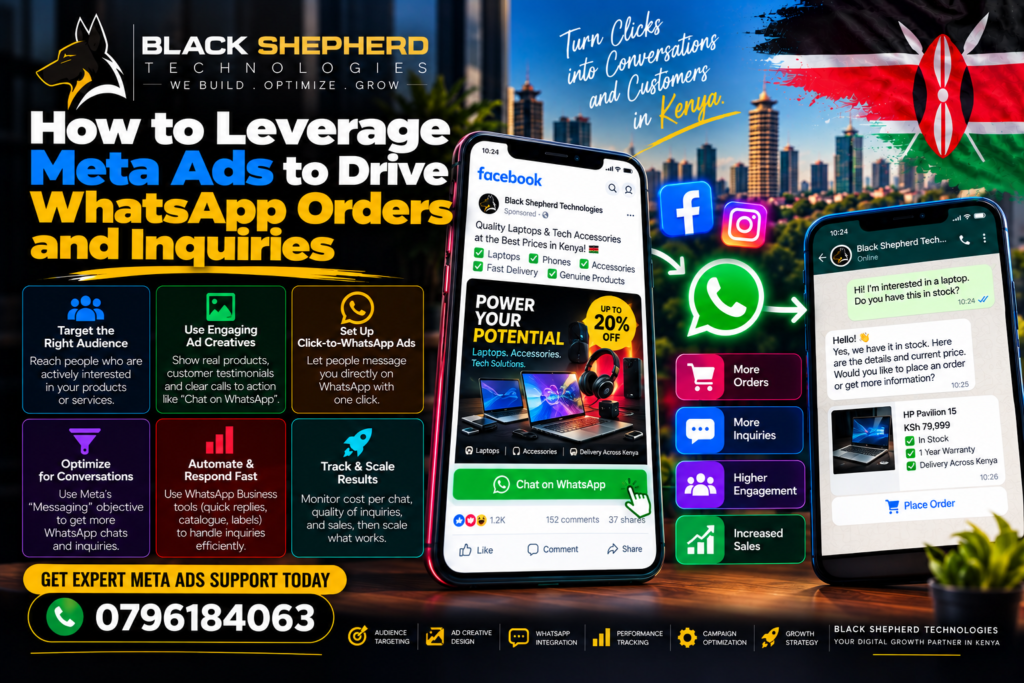
In mobile-first markets across Kenya and East Africa, WhatsApp is the primary business communication hub. While traditional ad funnels force users to navigate external, slow-loading websites or complete long contact forms, Click-to-WhatsApp (CTWA) Meta Ads take advantage of natural user behavior.
By connecting Facebook and Instagram ads directly to a real-time WhatsApp Business thread, you eliminate landing page drop-offs, speed up sales cycles, and build direct personal connections with prospective buyers.
However, running high-ROI Click-to-WhatsApp campaigns requires more than just picking a button. Without structured ad setups, automated qualification, fast response flows, and proper tracking, high inquiry volumes can quickly become an operational headache.
Here is a comprehensive, step-by-step masterclass on how to build, optimize, and scale Meta Ads that drive high-intent WhatsApp inquiries and direct orders.
1. Why Click-to-WhatsApp (CTWA) Ads Outperform Traditional Funnels
When you send Meta ad traffic to a traditional website, you risk losing visitors to slow mobile page load speeds, distracting menus, or complex checkout flows.
Traditional Ad Funnel vs. Click-to-WhatsApp Funnel
 Traditional:
 [ Meta Ad ] ──► [ External Website (50% Bounce) ] ──► [ Multi-Step Form / Checkout ] ──► [ High Drop-off ]

 Click-to-WhatsApp:
 [ Meta Ad ] ──► [ Instant WhatsApp Thread ] ──► [ Automated Pre-Fill / Agent ] ──► [ Immediate Order / Lead ]
Key Advantages of CTWA Campaigns:
-
Frictionless Conversion Path: A single tap on a mobile ad opens a familiar WhatsApp chat window prepopulated with a custom inquiry prompt.
-
72-Hour Free Messaging Window: Meta waives standard WhatsApp Business conversation fees for 72 hours when a chat is initiated directly from a Click-to-WhatsApp ad.
-
Higher Conversion Rates: Direct, personal real-time messaging allows your sales team or chatbot to overcome customer objections, confirm M-Pesa payments, and close deals immediately.
-
Re-engaging Prospects: Once a prospect initiates a chat, you retain a direct messaging channel (subject to compliance and opt-in guidelines) for future product launches and promotions.
To ensure your web architecture and overall digital strategy support your paid advertising funnels, pair your campaign setup with professional SEO services in Kenya.
To explore how high-performing, secure digital ecosystems support diverse commercial sectors, review the various industries we serve.
2. Setting Up Click-to-WhatsApp Ads in Meta Ads Manager
To ensure Meta’s delivery algorithms optimize for actual chat starts rather than meaningless link clicks, configure your campaign objectives correctly.
Ads Manager Setup Workflow
 ├── 1. Campaign Level: Select Objective ──► "Engagement" or "Leads"
 ├── 2. Ad Set Level: Set Conversion Location ──► "Messaging Apps" (Select WhatsApp)
 └── 3. Ad Level: Build Creative ──► Include Chat-Cue Graphics & Pre-Filled Message Prompts
Step-by-Step Setup Process:
-
Link Your WhatsApp Business Number: Go to your Facebook Business Page Settings →\rightarrow WhatsApp →\rightarrow Connect your official WhatsApp Business App or WhatsApp Business API phone number.
-
Select the Right Campaign Objective: In Meta Ads Manager, create a new campaign and select Engagement or Leads.
-
Avoid using the “Traffic” objective, as it optimizes for cheap ad clicks rather than actual opened WhatsApp conversations.
-
-
Configure the Ad Set Destination: Under Conversion Location, choose Messaging Apps. Select Click to Message as the ad type and select your connected WhatsApp number.
-
Targeting Strategy: Use broad demographic targeting within your local area (e.g., Nairobi, Mombasa, or nationwide) or layer broad custom/lookalike audiences. Let Meta’s machine learning locate users who are most likely to open a chat.
To inspect real-world examples of high-converting landing pages and digital lead funnels built for local brands, browse through our portfolios and projects.
3. High-Converting CTWA Ad Creatives and Copywriting
Because your ad leads to a private messaging app rather than a website, your visual creative and primary text must set clear expectations that the user is about to start a conversation.
Creative Elements for High CTR
 ├── Visual Signal: Prominent WhatsApp Icon Overlay on Images/Videos
 ├── Headline Hook: Conversation-First Copy ("Chat With Us On WhatsApp" / "Get Instant Quote")
 └── Pre-Filled Prompt: Contextual First Message ("Hi! I saw your offer for [Product] and want details...")
Creative & Copy Best Practices:
-
Add Visual WhatsApp Cues: Place a prominent green WhatsApp icon overlay on your ad images and videos. Seeing a chat badge instantly communicates that tapping the ad opens a direct conversation.
-
Conversation-Driven Headlines: Instead of broad website-style CTAs like “Shop Now,” use conversation-focused headlines such as “Chat On WhatsApp for Best Price,” “Get a Custom Quote in 2 Minutes,” or “Message Us to Order.”
-
Draft Contextual Pre-Filled Messages: Configure the Greeting / Message Template in Ads Manager with a pre-filled starting text.
-
Bad Pre-Fill:
"Hi" -
Good Pre-Fill:
"Hi! I saw your Meta ad for Executive Office Desks and would like to see catalog prices."
-
4. Building the First 60-Second Chat Experience
The fastest way to destroy your return on ad spend (ROAS) is taking hours to respond to an inquiry. Customers who tap a WhatsApp ad expect immediate interaction.
Ideal 60-Second Inbound Chat Architecture
 [ User Taps Pre-Filled Ad Prompt ]
                 │
                 ▼
 [ Automated Instant Greeting (Confirms Offer / Product) ]
                 │
                 ▼
 [ Quick-Reply Buttons: (1. View Catalog / 2. Request Quote / 3. Talk to Agent) ]
                 │
                 ▼
 [ Qualification / M-Pesa Checkout / Live Agent Handoff ]
Structuring Your Response Pipeline:
-
Automate the Initial Greeting: Use the WhatsApp Business App or specialized API platforms (e.g., Wati, ManyChat, or EngageLab) to send an instant response within 5 seconds of the user’s first message.
-
Use Interactive Quick-Reply Buttons: Provide 2 to 3 tap-friendly options to guide the conversation immediately:
-
[ 📦 View Product Catalog ] -
[ 💰 Request Custom Quote ] -
[ 👤 Speak with a Sales Specialist ]
-
-
Streamline Payment Confirmation: Provide clear M-Pesa Till/Paybill numbers or instant payment links directly inside the chat thread to secure immediate impulse orders.
5. Conversions API (CAPI) & Downstream Offline Attribution
A major challenge with messaging ads is training Meta’s AI to distinguish between a casual “tire-kicker” who sends a single message and a high-value customer who completes an order.
Closed-Loop Data Attribution Engine
 [ User Opens Chat (Inbound Webhook) ] ──► [ Captures `ctwa_clid` Meta Click ID ]
                                                           │
 [ Deal Closed / M-Pesa Order Confirmed ] ──► [ CAPI Event Fired back to Meta with `ctwa_clid` ]
Implementing Downstream Attribution:
When a user initiates a chat via a Click-to-WhatsApp ad, Meta attaches a unique tracking parameter (ctwa_clid) to the inbound webhook payload. By connecting your CRM or WhatsApp API platform back to Meta’s Conversions API (CAPI), you can pass back downstream conversion events (such as Lead Qualified or Purchase Completed). This trains Meta’s algorithm to target users who actually buy, rather than users who just send a greeting.
Click-to-WhatsApp Ad Execution Checklist
Final Thoughts: Scale Conversational Commerce Today
Click-to-WhatsApp Meta Ads offer an unparalleled channel for driving direct sales, generating qualified business inquiries, and building strong local brand relationships. By aligning your campaign objectives, designing conversation-focused creatives, configuring pre-filled prompts, deploying automated greetings, and closing the attribution loop via CAPI, you turn paid social traffic into a predictable sales engine.
Whether you need a complete audit of your paid ad accounts, high-converting landing page development, or professional SEO services in Kenya to build an organic search foundation alongside your messaging ads, expert digital execution ensures long-term business growth. Explore our specialized industries we serve and examine our proven track record across portfolios and projects to maximize your campaign performance today.


For expert Meta Ads campaign management, Click-to-WhatsApp automation flows, and technical digital marketing strategies, delivers comprehensive digital growth solutions tailored to businesses across Nairobi and East Africa.
Are you looking to set up an automated WhatsApp greeting flow for an e-commerce catalog, or would you like to optimize a Meta Ad campaign to generate leads for a corporate service business?