
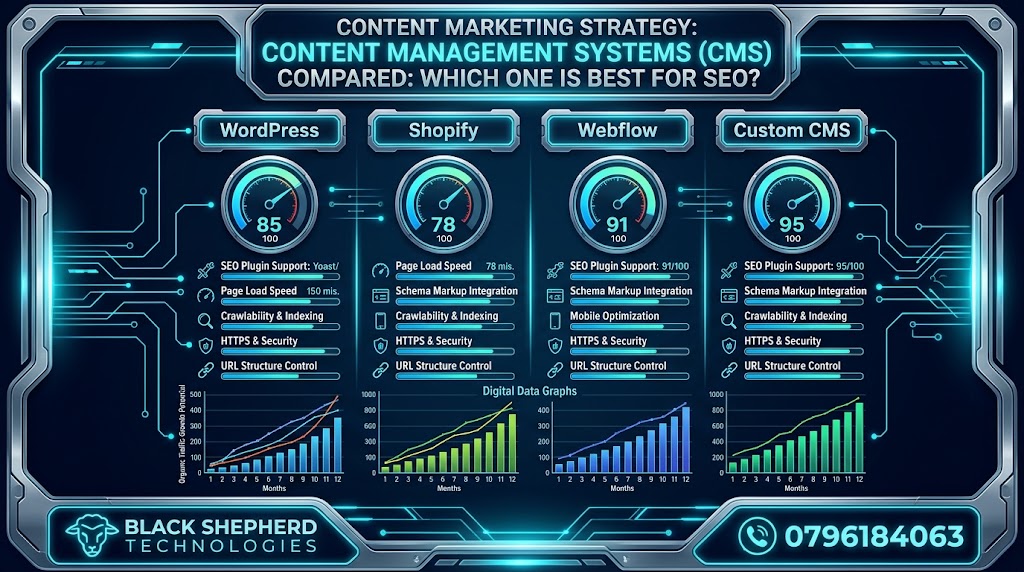
Selecting the right Content Management System (CMS) is one of the most critical structural decisions a business will ever make for its digital presence. Whether you are launching an enterprise firm in Nairobi, expanding an e-commerce brand across East Africa, or managing a high-traffic regional directory, your choice of CMS creates the technical foundation upon which all future Search Engine Optimization (SEO) efforts rest.
A common industry misconception is that search engines treat all CMS platforms equally. While Google’s algorithms evaluate websites based on content quality, backlink profiles, user experience, and technical performance rather than the platform’s brand name, your CMS dictates how easy or difficult it is to implement crucial SEO optimizations.
+-------------------------------------------------------------------------+
|                  THE CMS & SEO RELATIONSHIP FRAMEWORK                  |
+-------------------------------------------------------------------------+
|  CMS CORE INFRASTRUCTURE                                                |
|  - Server-side rendering & code cleanliness                             |
|  - Site architecture & URL slug flexibility                            |
|  - Core Web Vitals performance (LCP, INP, CLS)                          |
|                                                                         |
|  =====================================================================  |
|  DIRECT IMPACT ON SEARCH PERFORMANCE                                    |
|  - Crawl budget efficiency for search engine bots                       |
|  - Indexation speed & structured data (Schema) deployment               |
|  - Mobile usability & page load speeds                                  |
+-------------------------------------------------------------------------+
Some platforms provide out-of-the-box speed, clean source code, and full control over meta tags, canonical URLs, and schema markup. Others lock you inside rigid closed-source frameworks, generating bloated code, slow server response times, and inflexible URL structures that hinder organic search performance.
When evaluating web platforms, integrating custom development with expert SEO services in Kenya ensures your site architecture is optimized for search engines and user conversions.
1. What Makes a CMS “SEO-Friendly”? Core Criteria
Before comparing specific platforms, we must define the technical benchmarks that determine whether a CMS supports modern search engine requirements. A truly SEO-friendly CMS should give you direct control over key technical and on-page elements:
                  +-----------------------------------+
                  |    SEO-FRIENDLY CMS BENCHMARKS    |
                  +-----------------------------------+
                                    |
     +-----------------+------------+------------+-----------------+
     |                 |                         |                 |
     v                 v                         v                 v
+----------+     +------------+            +------------+    +-----------+
| TECHNICAL|     | ON-PAGE    |            | INDEXATION |    | TECHNICAL |
| SPEED    |     | METADATA   |            | CONTROL    |    | ARCH      |
| Lightweight    | Title tags,             | Canonical   |    | Custom    |
| code, fast     | descriptions,           | tags, custom|    | clean URLs|
| response| H-tags & Alt text| sitemaps| & 301s|
+----------+     +------------+            +------------+    +-----------+
Essential Technical SEO Features
-
Customizable Metadata: Total control over Title Tags, Meta Descriptions, Open Graph tags, and Header Tags (
H1throughH6) across every page. -
Clean URL Structure: The ability to generate short, keyword-rich, custom URL slugs without forced system directories (e.g., preventing unwanted URL prefixes like
/pages/or/item/). -
Canonicalization & Redirect Management: Native tools or seamless integrations to set custom canonical tags and manage 301 redirects to eliminate duplicate content issues.
-
Structured Data (Schema Markup): Easy deployment of JSON-LD schema (e.g.,
LocalBusiness,Article,Product,FAQPage) to power search engine rich snippets. -
Core Web Vitals & Speed Optimization: Clean source code generation, automatic image compression, support for modern WebP formats, dynamic caching, and fast server response times.
-
Automatic XML Sitemaps & Robots.txt: Automatic generation and updating of XML sitemaps alongside a customizable
robots.txtfile to manage search engine crawling. -
Mobile Responsiveness: Fluid, mobile-first design rendering out of the box.
2. In-Depth Comparison of the Top CMS Platforms for SEO
Let’s evaluate the most popular Content Management Systems across the web landscape, assessing their SEO strengths, technical limitations, and ideal business use cases.
A. WordPress (.org): The Open-Source Undisputed Standard
Powering over 43% of all websites on the internet, WordPress.org remains the most popular open-source content management system.
+-------------------------------------------------------------------------+
|                  WORDPRESS FOR SEO: AT A GLANCE                         |
+-------------------------------------------------------------------------+
|  PROS:                                                                  |
|  - Unmatched technical SEO control & customizability                   |
|  - Industry-leading SEO plugins (Rank Math, Yoast SEO, AIOSEO)         |
|  - Total ownership of source code, hosting, & database structure       |
|  - Instant deployment of JSON-LD schema & custom redirects              |
|                                                                         |
|  CONS:                                                                  |
|  - Heavy plugins and unoptimized themes can cause code bloat          |
|  - Requires active maintenance, security patches, & hosting tuning      |
+-------------------------------------------------------------------------+
SEO Strengths
WordPress offers granular control over every technical SEO parameter. With plugins like Rank Math, Yoast SEO, or SEOPress, users can configure XML sitemaps, automated 301 redirects, canonical tags, open graph metadata, and complex JSON-LD structured data without touching server files. WordPress also excels at content taxonomy, making it easy to build structured category and tag hierarchies.
SEO Drawbacks
The main risk with WordPress is plugin bloat. Non-technical users often install dozens of unoptimized plugins and heavy page builders (like unconfigured Elementor or Divi setups). This creates unnecessary code bloat, inflates DOM size, slows down page load speeds, and hurts Google’s Core Web Vitals scores.
-
Best For: Corporate organizations, service businesses, news portals, content publishers, and growing enterprises that require full technical flexibility.
B. Webflow: The Designer’s No-Code SEO Powerhouse
Webflow has quickly grown in popularity among digital agencies and modern brands seeking custom design capabilities alongside clean technical architecture.
+-------------------------------------------------------------------------+
|                    WEBFLOW FOR SEO: AT A GLANCE                         |
+-------------------------------------------------------------------------+
|  PROS:                                                                  |
|  - Generates exceptionally clean, semantic HTML/CSS code              |
|  - High Core Web Vitals performance powered by AWS/Fastly CDN          |
|  - Native metadata, canonical, and 301 redirect controls               |
|  - Native dynamic CMS collections with custom schema mapping            |
|                                                                         |
|  CONS:                                                                  |
|  - Steeper learning curve for non-designers                             |
|  - Subscription pricing scales as traffic and features grow             |
+-------------------------------------------------------------------------+
SEO Strengths
Webflow stands out by producing extremely clean, semantic HTML5 code. Unlike traditional visual builders, Webflow does not inject bloated code wrappers into pages. Hosted on Amazon Web Services (AWS) and served via Fastly CDN, Webflow sites load quickly and perform well on Core Web Vitals metrics out of the box. It includes built-in controls for meta titles, descriptions, open graph assets, auto-generated sitemaps, custom robots.txt files, and native 301 redirect management.
SEO Drawbacks
Webflow’s CMS collection limits can become restrictive for massive enterprise sites with tens of thousands of dynamic pages unless upgraded to high-tier plans. Additionally, implementing complex, multi-layered international SEO setups (such as multi-lingual hreflang routing) requires custom workarounds compared to dedicated WordPress enterprise translation plugins.
-
Best For: Design-forward brands, SaaS platforms, tech startups, and professional service agencies wanting fast performance without handling server infrastructure.
C. Shopify: The E-Commerce Search Engine Leader
For online merchants, Shopify is a leading SaaS platform for managing product catalogs, inventory, and payment processing.
+-------------------------------------------------------------------------+
|                    SHOPIFY FOR SEO: AT A GLANCE                         |
+-------------------------------------------------------------------------+
|  PROS:                                                                  |
|  - Native product schema markup built into modern themes                 |
|  - Hosted infrastructure designed for high concurrency & uptime          |
|  - Automatic SSL certificates, fast global CDN, & mobile readiness     |
|                                                                         |
|  CONS:                                                                  |
|  - Forced URL structure (`/products/`, `/collections/`, `/pages/`)      |
|  - Product collection tagging can create duplicate content issues       |
|  - Rigid blog structure compared to dedicated content platforms         |
+-------------------------------------------------------------------------+
SEO Strengths
Shopify is designed specifically for selling products online. Modern Shopify themes feature built-in Product, Offer, and AggregateRating JSON-LD schema out of the box, ensuring your items display star ratings, pricing, and stock status directly in Google Search SERPs. It handles technical hosting, SSL certificates, mobile optimization, and CDN delivery automatically.
SEO Drawbacks
Shopify enforces a strict, unalterable URL structure. All products must reside under /products/, collection pages under /collections/, and regular pages under /pages/. This removes the ability to build fully customized URL slugs. Additionally, Shopify’s collection filtering system often generates duplicate canonical URLs for products belonging to multiple categories, requiring custom Liquid code edits or specialized apps to fix.
-
Best For: Small to large-scale e-commerce stores focusing on physical and digital products.
Reviewing real-world case studies across our portfolios and projects highlights how combining custom platform builds with strategic SEO execution helps brands dominate search visibility across competitive African markets.
D. Custom Headless CMS (Next.js + Strapi / Sanity / Contentful)
For enterprise organizations requiring ultra-fast speeds, enterprise security, and multi-platform content distribution, Headless CMS architectures represent a modern option.
                  +-----------------------------------+
                  |     HEADLESS ARCHITECTURE MODEL   |
                  +-----------------------------------+
                                    |
          +-------------------------+-------------------------+
          |                                                   |
          v                                                   v
+-----------------------------------+               +-----------------------------------+
|  BACKEND CONTENT REPOSITORY       |               |  FRONTEND RENDERING FRAMEWORK     |
|  (Strapi, Contentful, Sanity)     | === API ====> |  (Next.js, Nuxt.js, React)        |
|  - Pure database content management|               |  - Ultra-fast static server render|
|  - Zero presentation layer        |               |  - Complete HTML code control   |
+-----------------------------------+               +-----------------------------------+
SEO Strengths
Headless architectures completely decouple content management from the frontend presentation layer. Using modern frontend frameworks like Next.js or React, developers have total control over every line of generated HTML, CSS, and JavaScript. Pages can be pre-rendered on the server (Server-Side Rendering / SSR or Incremental Static Regeneration / ISR), delivering exceptionally fast loading speeds and near-perfect Core Web Vitals scores.
SEO Drawbacks
A Headless CMS possesses zero native SEO capabilities out of the box. Every single SEO feature—including meta title tags, open graph attributes, sitemap generation, canonical routing, and schema rendering—must be manually coded by software engineers. Without an experienced technical SEO team, critical optimization features can easily be overlooked.
-
Best For: Enterprise platforms, high-traffic marketplaces, financial institutions, and multi-national portals with dedicated software engineering teams.
E. SaaS Website Builders: Wix & Squarespace
SaaS platforms like Wix and Squarespace cater to non-technical users, small business owners, and creative portfolios.
+-------------------------------------------------------------------------+
|                  WIX & SQUARESPACE FOR SEO: SUMMARY                     |
+-------------------------------------------------------------------------+
|  PROS:                                                                  |
|  - Frictionless, beginner-friendly setup with zero coding              |
|  - Built-in basic SEO wizards, meta tag inputs, & automated SSL       |
|                                                                         |
|  CONS:                                                                  |
|  - Limited technical customization & custom code control               |
|  - Slower scripts & rendering speeds compared to custom platforms       |
|  - Restrictive database architecture for complex topical hubs          |
+-------------------------------------------------------------------------+
SEO Capabilities & Trade-offs
Wix and Squarespace have improved their SEO features over time. Both now support customizable page titles, meta descriptions, URL slugs, image alt text, basic 301 redirects, and integrated Google Search Console pairing.
However, they remain restrictive for advanced SEO strategies. Page rendering relies heavily on client-side JavaScript frameworks, which can slow down mobile loading times. Furthermore, users cannot modify server-level caching headers, implement complex database-driven schema rules, or restructure root directory settings.
-
Best For: Freelancers, local service providers, creative portfolios, and early-stage small businesses that need a simple online presence.
3. Comprehensive Feature Matrix: CMS SEO Capabilities Compared
This comparison table breaks down how each CMS handles critical search engine optimization features:
| Platform | Meta Control | Core Web Vitals Potential | Canonical & 301 Support | Custom Schema Control | Code Cleanliness | Learning Curve |
| WordPress (.org) | ★★★★★ (Unlimited) | ★★★★☆ (Needs tuning) | ★★★★★ (Native/Plugins) | ★★★★★ (Full control) | ★★★★☆ (Theme dependent) | Moderate |
| Webflow | ★★★★★ (Native) | ★★★★★ (Excellent CDN) | ★★★★★ (Native) | ★★★★☆ (Custom/JSON-LD) | ★★★★★ (Clean HTML) | Moderate–High |
| Shopify | ★★★★☆ (Native) | ★★★★☆ (Hosted) | ★★★☆☆ (Restricted URLs) | ★★★★☆ (Liquid/Built-in) | ★★★★☆ (Liquid code) | Low–Moderate |
| Headless (Next.js) | ★★★★★ (Custom code) | ★★★★★ (Near Perfect) | ★★★★★ (Developer setup) | ★★★★★ (Developer setup) | ★★★★★ (Zero bloat) | Very High (Devs required) |
| Wix / Squarespace | ★★★☆☆ (Basic) | ★★★☆☆ (JavaScript heavy) | ★★★☆☆ (Basic native) | ★★☆☆☆ (App dependent) | ★★☆☆☆ (SaaS bloat) | Very Low |
Discover how tailored CMS selection and technical optimization elevate brands across various market segments by exploring our guide to the industries we serve, covering real estate, professional services, hospitality, healthcare, e-commerce, and corporate enterprise.
4. Technical Deep Dive: Core Web Vitals, Crawl Efficiency & Code Bloat
Search engines don’t just evaluate the words on your page; they assess how fast and smoothly your website renders for users.
+-------------------------------------------------------------------------+
|                       CORE WEB VITALS METRICS                           |
+-------------------------------------------------------------------------+
|  1. LCP (Largest Contentful Paint) --> How fast main content renders   |
|  2. INP (Interaction to Next Paint)--> How responsive the page feels   |
|  3. CLS (Cumulative Layout Shift)  --> Visual stability during loading |
+-------------------------------------------------------------------------+
Server-Side Rendering (SSR) vs. Client-Side Rendering (CSR)
How your CMS renders HTML directly impacts crawl budget efficiency. Search engine bots (like Googlebot) can crawl pre-rendered Server-Side HTML instantly.
If your CMS relies heavily on Client-Side Rendering (CSR) via heavy JavaScript bundles—a common issue with unoptimized Wix templates or JavaScript-heavy single-page applications—Googlebot must perform a two-wave indexing process:
-
Wave 1: Crawling raw HTML (which often lacks fully rendered content).
-
Wave 2: Queueing the JavaScript for rendering when processing capacity allows.
This delay can slow down how quickly new content, blog posts, or product additions are indexed.
                  +-----------------------------------+
                  |   CRAWLING & INDEXATION SPEED     |
                  +-----------------------------------+
                                    |
          +-------------------------+-------------------------+
          |                                                   |
          v                                                   v
+-----------------------------------+               +-----------------------------------+
| SERVER-SIDE RENDERING (SSR)       |               | CLIENT-SIDE RENDERING (CSR)       |
| (WordPress, Webflow, Next.js)     |               | (Heavy JS Builders / React CSR)   |
| Googlebot reads complete HTML     |               | Googlebot must queue & render     |
| instantly. Fast indexation!       |               | JavaScript. Indexation delays!    |
+-----------------------------------+               +-----------------------------------+
5. Decision Framework: Choosing the Best CMS for Your Business
To select the ideal Content Management System for your organization, assess your internal resources, technical capabilities, and business goals using this evaluation framework:
+---------------------------------------------------------------------+
|                      CMS SELECTION DECISION TREE                    |
+---------------------------------------------------------------------+
| WHAT IS YOUR PRIMARY BUSINESS OBJECTIVE?                            |
|                                                                     |
| +--> E-Commerce focus with large catalog?                           |
| |    --> Select SHOPIFY                                        |
| |                                                                   |
| +--> Content publishing, SEO flexibility, & total control?          |
| |    --> Select WORDPRESS (.org)                               |
| |                                                                   |
| +--> Custom design-led marketing site with clean performance?       |
| |    --> Select WEBFLOW                                         |
| |                                                                   |
| +--> Enterprise platform with dedicated engineering teams?          |
|      --> Select HEADLESS (Next.js + Strapi/Sanity)                 |
+---------------------------------------------------------------------+
Key Questions to Ask Before Choosing:
-
What is your internal technical expertise? Do you have dedicated web developers, or will non-technical marketing staff manage daily content updates?
-
What is your primary revenue model? Are you driving sales through an e-commerce store, generating leads for professional services, or monetizing high-volume editorial content?
-
What is your budget for ongoing maintenance? Open-source platforms like WordPress offer lower entry costs but require ongoing maintenance, security updates, and hosting optimization. SaaS platforms like Webflow and Shopify bundle hosting and security into predictable monthly fees.
-
How complex are your technical SEO requirements? Do you require custom multi-regional directories, complex dynamic content filtering, or deep CRM integration?
The Verdict: Which CMS Wins the SEO Battle?
There is no single “best” CMS for every use case—the ideal platform depends on your business goals, technical resources, and operational scale:
-
The Overall Winner for Flexibility & Control: WordPress (.org) remains the industry standard for content marketing, service businesses, and corporate publications. Its plugin ecosystem gives you complete control over every on-page and technical SEO parameter.
-
The Winner for Clean Design & Speed: Webflow is the top choice for modern marketing sites and design agencies that want clean HTML code, fast CDN hosting, and strong Core Web Vitals performance without managing server infrastructure.
-
The Winner for E-Commerce: Shopify leads for online stores, providing solid native schema, reliable infrastructure, and fast mobile shopping experiences out of the box.
-
The Winner for Enterprise Scale: Custom Headless CMS (Next.js) delivers unmatched speed, security, and rendering control for large organizations with dedicated engineering teams.
Your CMS provides the foundation for your search engine visibility. Partnering with experienced digital specialists ensures your platform choice aligns with your long-term search strategy and business growth.
Ready to build an SEO-optimized website that outranks the competition? Contact the engineering and search strategy team at Black Shepherd today to access tailored SEO services in Kenya, review high-performing website builds in our portfolios and projects, and discover specialized digital solutions across the industries we serve.