
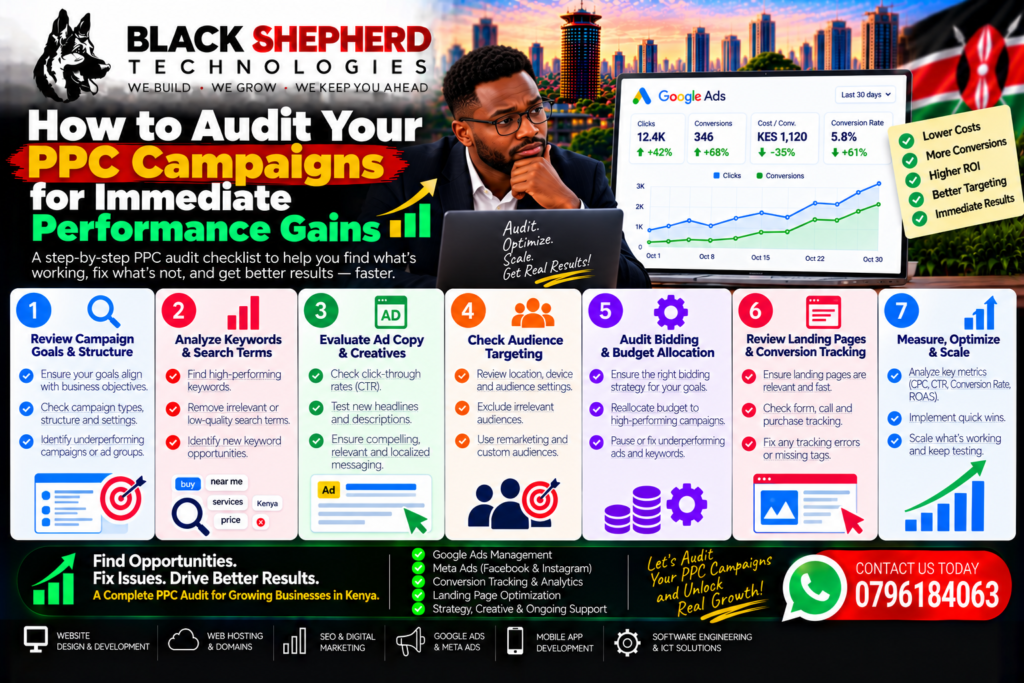
When Pay-Per-Click (PPC) campaigns underperform, the knee-jerk reaction is often to increase daily ad spend or completely rewrite ad copy. In reality, most budget leaks in Google Ads, Meta Ads, and other paid media accounts stem from preventable structural flaws, tracking disconnects, and unoptimized settings.
Performing a structured PPC audit allows you to identify where ad spend is being wasted, reclaim lost budget, and rapidly scale return on ad spend (ROAS).
This step-by-step audit framework guides you through inspecting account architecture, tracking fidelity, search query cleanliness, and conversion funnel mechanics for immediate performance gains.
The PPC Campaign Audit Checklist
Use this high-impact checklist to systematically evaluate your active campaigns and patch budget leaks:
+-----------------------------------------------------------------------------------+
|                            PPC AUDIT EXECUTIVE ROADMAP                            |
+--------------------+--------------------+--------------------+--------------------+
| 1. TRACKING & DATA | 2. GOOGLE SEARCH   | 3. AD CREATIVE &   | 4. LANDING PAGE &  |
|    VALIDATION      |    QUERY CLEANUP   |    SETTINGS        |    CONVERSION UX   |
+--------------------+--------------------+--------------------+--------------------+
| • Verify Server-   | • Audit Search     | • Check Location & | • Benchmark Page   |
|   Side CAPI/GA4    |   Terms Report     |   Device Bids      |   Speed (< 2s)     |
| • Check Duplicate  | • Apply Negative   | • Audit Bidding    | • Test Message     |
|   Conversion Tags  |   Keyword Shield   |   Strategy Fit     |   Match & Forms    |
| • Verify Offline   | • Evaluate Keyword | • Inspect Ad       | • Audit Mobile     |
|   CRM Sync         |   Match Types      |   Frequency Rates  |   Payment UX       |
+--------------------+--------------------+--------------------+--------------------+
Phase 1: Verify Conversion Tracking & Data Accuracy
An ad campaign cannot optimize effectively if it receives inaccurate feedback. Auditing tracking setup is the single most important step in any PPC evaluation.
1. Identify Over-Reporting or Under-Reporting
-
Duplicate Conversion Tags: Verify that primary conversion actions (e.g., lead form completions or purchases) trigger strictly once per session. Multiple tags firing on page refreshes artificially inflate conversion numbers and confuse automated bidding algorithms.
-
Server-Side Tracking (CAPI) & GA4 Alignment: Compare ad platform reported conversions against Google Analytics (GA4) and your internal CRM log. If Meta or Google Ads reports 100 conversions but your CRM only logged 60, your tracking tags are misfiring on non-converting page visits.
-
Deduplication: Ensure client-side browser pixels and server-side Conversions API (CAPI) events share a unique
event_idattribute so ad networks properly deduplicate actions.
Phase 2: Audit Google Search Terms & Keyword Match Types
In Google Ads, broad match keywords combined with unmonitored automated bidding can consume significant budget on non-buying queries.
+-----------------------------------------------------------------------------------+
|                        SEARCH QUERY WASTE IDENTIFICATION                          |
+------------------------+---------------------------------+------------------------+
| Target Keyword (Broad) | Triggered User Search Query     | Intent / Action Needed |
+------------------------+---------------------------------+------------------------+
| "web design agency"    | professional web design agency  | HIGH INTENT (Keep)     |
| "web design agency"    | free web design agency course   | NO INTENT (Exclude)    |
| "web design agency"    | web design agency jobs entry    | NO INTENT (Exclude)    |
+------------------------+---------------------------------+------------------------+
2. Clean Up the Search Terms Report
-
Examine the Search Terms Report: Navigate to Insights & Reports > Search Terms in Google Ads. Filter by total spend over the last 30 to 90 days.
-
Identify Negative Keyword Candidates: Look for recurring non-buyer intent words such as “free,” “jobs,” “definition,” “salary,” “login,” “template,” or “PDF.” Add these immediately to an account-level negative keyword list.
-
Review Match Type Granularity: Ensure high-converting exact
[keyword]and phrase"keyword"match types are isolated with dedicated ad copy and landing pages, rather than relying exclusively on broad match queries.
Phase 3: Inspect Campaign Settings, Targeting & Networks
Default ad platform settings often favor maximum platform reach over campaign efficiency.
3. Review Search Network Expansion Settings
-
Disable Unwanted Search Partners: In Google Ads Search campaigns, verify if Search Partners or Display Network Expansion options are enabled. Display Expansion on Search campaigns frequently delivers low-quality impressions and inflates bounce rates.
4. Audit Location & Device Performance
-
Location Targeting Mechanics: Ensure location settings are configured to “Presence: People in or regularly in your targeted locations” rather than “Presence or Interest.” The “Interest” setting can serve ads to users outside your target geographic region who are merely searching about it.
-
Device Bid Adjustments: Check campaign performance split by Mobile, Desktop, and Tablet. If mobile traffic accounts for 80% of spend but yields a low conversion rate due to an unoptimized checkout, apply a negative device bid adjustment until the mobile UX is fixed.
Phase 4: Evaluate Creative Quality, Ad Fatigue & Offers
Ad performance naturally degrades over time as target audiences experience creative fatigue.
                           THE CREATIVE FATIGUE CURVE
     ROAS / CTR
         ^
    High |       /-----\
         |      /       \  <-- Creative Fatigue Threshold
         |     /         \
         |    /           \  <-- Rising Frequency & Fatigue Sets In
     Low +--------------------------------------------------> Time / Impressions
5. Check Frequency & Click-Through Rates (CTR)
-
Monitor Impression Frequency: On social ad platforms (Meta, TikTok), check user frequency metrics. If cold prospecting ad sets show a frequency above 2.5–3.0 alongside declining CTRs, the ad creative is fatigued and needs immediate rotation.
-
Audit Ad Assets & Copy Match: Check Google Ads Responsive Search Ads (RSAs). Ensure ad extensions (sitelinks, callouts, structured snippets, call extensions) are fully populated to maximize visual real estate on search engine results pages (SERPs).
Phase 5: Assess Landing Page Performance & User Experience (UX)
An ad audit is incomplete without inspecting where the ad traffic lands. High ad costs often reflect poor landing page conversion rates rather than weak ad copy.
6. Benchmark Landing Page Load Speed
-
Page Speed Test: Run destination URLs through speed test tools. If a landing page takes longer than 2 seconds to load on mobile connections, drop-off rates spike dramatically. Compress assets and reduce heavy scripts to improve speed.
7. Enforce Message Match & Reduce Form Friction
-
Verify Message Match: Ensure the main headline (H1) on your landing page directly mirrors the offer and headline promised in the ad.
-
Streamline Lead Capture Forms: Audit fields on lead forms. Reduce form inputs to essential information (Name, Email, Phone/WhatsApp). Every extra field can decrease conversion rates by up to 10%.
-
Localized Payment Options: For regional and e-commerce campaigns, verify that frictionless mobile payment methods (such as M-Pesa STK Push or instant checkout links) are functioning smoothly.
Immediate Action Plan: What to Do Post-Audit
-
Pause Top Budget Wasters: Immediately pause keywords, search terms, or ad sets that have consumed more than 2x your target Cost Per Acquisition (CPA) without yielding a single conversion.
-
Apply Negative Keywords: Add non-buyer queries uncovered in your Search Terms audit to your global negative keyword list.
-
Fix Tracking Breakages: Resolve any missing or duplicated pixel and server-side CAPI events before scaling budget.
-
Deploy Fresh Ad Creatives: Replace fatigued social ad creatives with new visual hooks, headlines, and video formats.
Need a Professional PPC Audit?
At Black Shepherd Technologies, we perform technical PPC account audits, repair tracking setups, and build high-converting landing page funnels to maximize your advertising return on investment.
Request a comprehensive ad account audit at blackshepherd.co.ke.